
A Google Business Profile Offer is free, takes ten minutes, and can show up directly in Google's AI-powered search results. Here's how to set one up.
Most people check a business’s Google listing before they ever visit the website. An Offer is the one thing you can put directly on that listing, for free, that gives someone a reason to act right now instead of just noting your number down for later.
It’s a specific type of Google Business Profile post. Instead of a plain update, an Offer has its own fields: a title, a start and end date, a description, and optionally a coupon code or a link where someone can redeem it. Active offers show up in a dedicated “Offers” tab on your listing in Search and Maps, so it’s more visible than a normal post buried in your update history.
You don’t need any special access beyond what you already use to manage your listing:
That’s the whole mechanism. The part that actually matters is what the offer says and who it’s aimed at, which is where most businesses leave value on the table by posting something generic.
An offer costs nothing to run, doesn’t need ad spend, and gives Google a reason to treat your listing as active (profiles that get regularly updated tend to perform better than ones that sit static for months). It also gives an on-the-fence searcher, someone comparing three businesses in the map pack, an actual reason to pick yours over a competitor with an identical star rating.
These are starting points, not a template to copy exactly. The best offers are specific to a real cost, fear, or timing pressure your actual customers have.
Skip bin hire
Tyres
Home builders
Digital marketing agencies
Plumbers
CCTV installation
Commercial cleaning
The “coupon code or redemption link” field in an offer post is optional, but leaving it blank wastes a real opportunity. Point that link at an actual page on your own site describing the same offer, not just your homepage or a generic contact form.
Here’s why it matters beyond the listing itself. Google’s AI-generated search results (AI Overviews, AI Mode) pull from real indexed web pages, not only from profile data sitting inside Google’s own systems. An offer that only exists inside your GBP listing gives those systems nothing to reference. A matching page on your own website, spelling out the same offer in plain terms (what it is, who it’s for, the dates it runs), gives search engines something concrete to find, index, and potentially cite when someone asks an AI search tool about businesses like yours nearby.
Here’s a real example, not a mock-up. This is Google AI Mode’s actual answer to a search about tyre deals in Kunda Park, pulling a genuine, currently-running offer straight from a business’s listing:
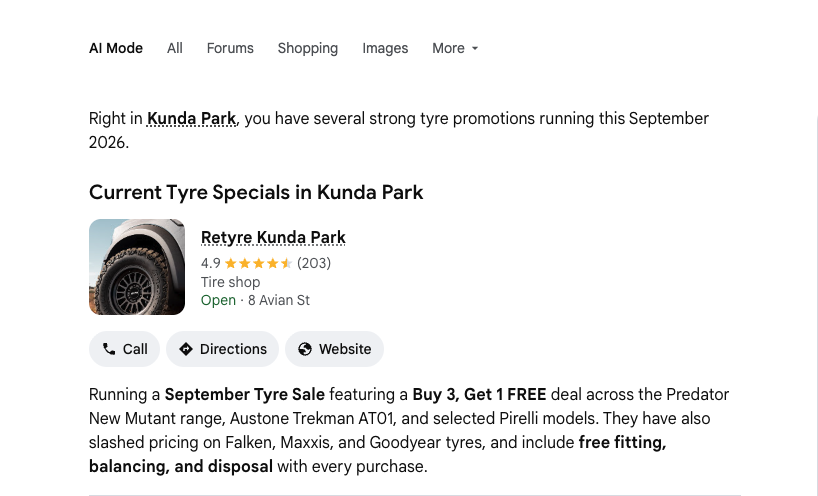
That’s exactly the kind of visibility an active offer can earn, for free, without anyone even clicking through to a website first.
You don’t need a brand new page for every single offer. One simple, regularly updated “Current Offers” page that always matches whatever’s live on your Business Profile does the job.
A few things worth checking before publishing any offer: set a real end date (an offer that never expires just looks like stale content), always include a photo, and if you’re offering a discount code, actually track how many times it gets used so you know if it’s worth repeating.
If Google Business Profile management is already part of what we handle for your account, this is exactly the kind of thing worth raising with your account manager. It’s a five-minute addition with a real shot at turning listing views into actual enquiries.
Free calculator
Most business owners have no idea how much revenue their Google ranking is leaving on the table. Find out yours in 2 minutes.
Calculate What #1 Is Worth →Free · No sales call